Would you use a live F1 pit wall? Tell us in 30 seconds.

Live pit wall survey

Anonymous: no account, no email. One answer per browser.

1. Do you want a live version?
2. Do you have F1 TV Pro?
3. How many times would you open it per race weekend?
4. What else would you like? (pick any)
F1 race analysis software · now in the browser

F1 live timing & race replay —
your own pit wall in the browser.

Timing tower, track map, tyre strategy, pit window and speed trace on one wall. Don't just track two drivers — read the full field, every window synced to the official timestamps.

0.5–128×
replay speed
12 + 8
windows
60 fps
interpolated
Japanese Grand Prix · RaceLAP 30/5312 windows · 60 fps · replay
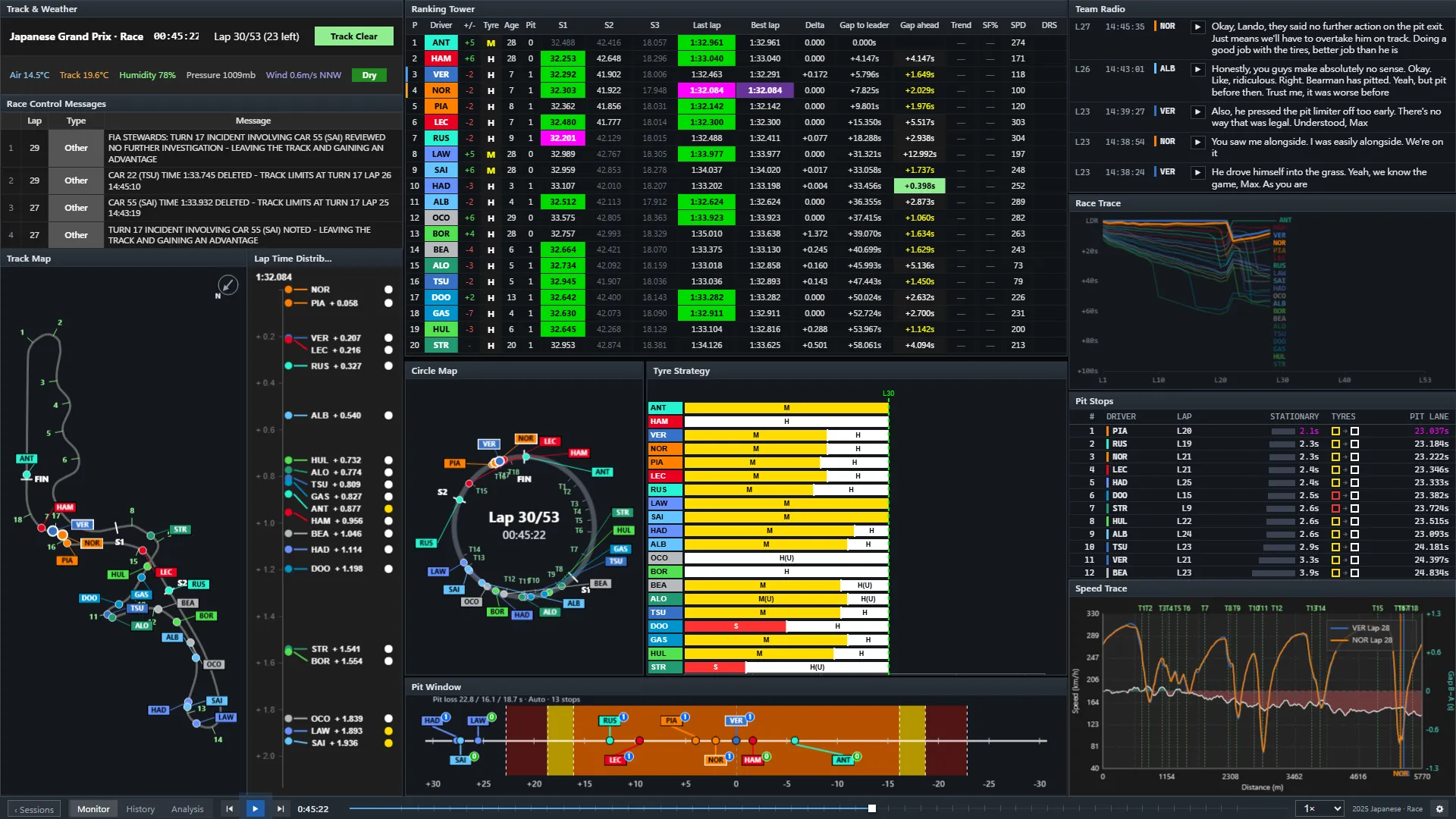
PITWALL monitor wall at lap 30 of the 2025 Japanese Grand Prix: ranking tower, track map, circle map, tyre strategy, pit window, speed trace, team radio, race trace and pit stops
LIVE

Follow the session while it runs.

Free, no account: the ranking tower, tyres, pit stops, race control and radio for every practice, qualifying, sprint and race. Connect your own F1 TV subscription to add the live track map and telemetry.

F1 live timing

The official live timing feed as a pit wall you arrange yourself, every window on one clock.

  • Ranking tower for all 20 cars: position changes, three sector times with the session-best colours, last and best lap, gaps to the leader and the car ahead.
  • Tyres, pit stops and the pit window, race control messages, weather and team radio, playable in place.
  • A delay that matches your TV: 10 seconds behind the feed by default, adjustable from 0 to 120 seconds.
  • Look back, then catch up: pause or drag back to review an incident, one click returns to the live point.
More about live timing

F1 live tracker

Who is where, and what is about to happen: the whole field at once, not just the two drivers a broadcast follows.

  • Track map and circle map: every car as a labelled dot; without F1 TV the circle map is estimated from the timing data and says so.
  • Gaps over time: race trace and gap evolution show pit stops, safety cars and undercuts as shapes.
  • Strategy and pit stops: each stint and compound, stationary and pit-lane times, where a stop would drop each driver.
  • Track map, speed trace, throttle and brake need car data that F1 only sends to signed-in F1 TV subscribers; the access token stays in your browser.
More about the live tracker
01 / FEATURES

Built like a pit wall, not a dashboard.

The same analysis modules as the PITWALL desktop app, rebuilt for the web. No install, no Python environment.

01

Multi-window wall

Drag, resize, snap, maximise. Pop any window out to a second or third monitor and it keeps running. Right-click any window for its own options.

  • Drag / snap / resizelive
  • Pop-out windowslive
  • Layout rememberedlive
02

Live Time sync

Every module replays by the official timing timestamp — positions, lap times, telemetry, weather — interpolated at 60 fps.

  • Clockofficial timestamps
  • Interpolation60 fps
  • Speed0.5×–128×
03

Proven algorithms

Ported from the original Python PITWALL, checked against its output lap by lap.

  • Ranking towerPit Window
  • Tyre StrategySpeed Trace
  • Lap / Speed / Throttle History
04

Every race, 2025–2026

Start with the full 2025 and 2026 Japanese GP replays. The complete race calendars are on the way.

  • 2025 Japanese GPlive
  • 2026 Japanese GPlive
  • Other roundssoon
Pop out to any screen. The window stays on the same clock.
Steady at 8x. Driver labels glide, never jump.
02 / WINDOWS

Radio, race trace and pit stops, on the wall.

Three new windows sit in the default Monitor layout. Add more from the right-click menu.

Team Radio

Every clip so far, playable in place, with the transcript beside it. Transcribed by BazaarLink.

Race Trace

Every car's gap to the leader at the end of each lap. Pit stops, safety cars and undercuts show up as shapes.

Pit Stops

Stationary time and pit-lane time for every stop, tyres in and out, the fastest highlighted in purple.

03 / SCREENS

Real screens. 2025 Japanese Grand Prix.

Nothing here is a mock-up — these are captures of the current build.

Monitor page at lap 30 of the 2025 Japanese Grand Prix

Monitor — the race, right now

  • Ranking tower with sectors, gaps and session-best purple
  • Track map and circle map
  • Tyre strategy and pit window
  • Race control, weather, speed trace, team radio, race trace, pit stops
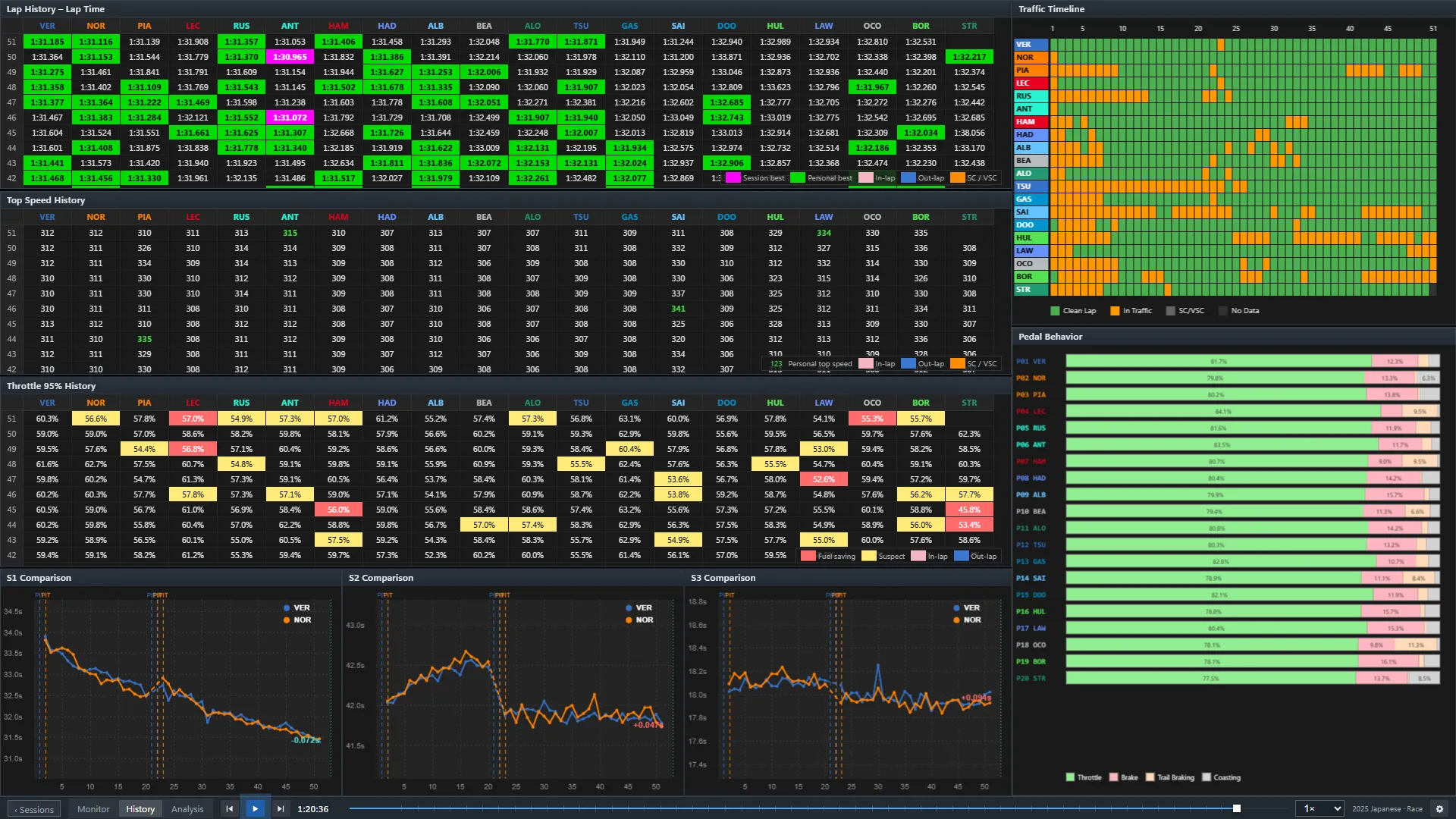
History page at lap 53: lap time, top speed and throttle history, sector comparison, traffic and pedal behaviour

History — the whole race, lap by lap

  • Lap time, top speed and throttle history for all 20 cars
  • Traffic timeline: clean lap vs. in traffic
  • S1 / S2 / S3 comparison and pedal behaviour
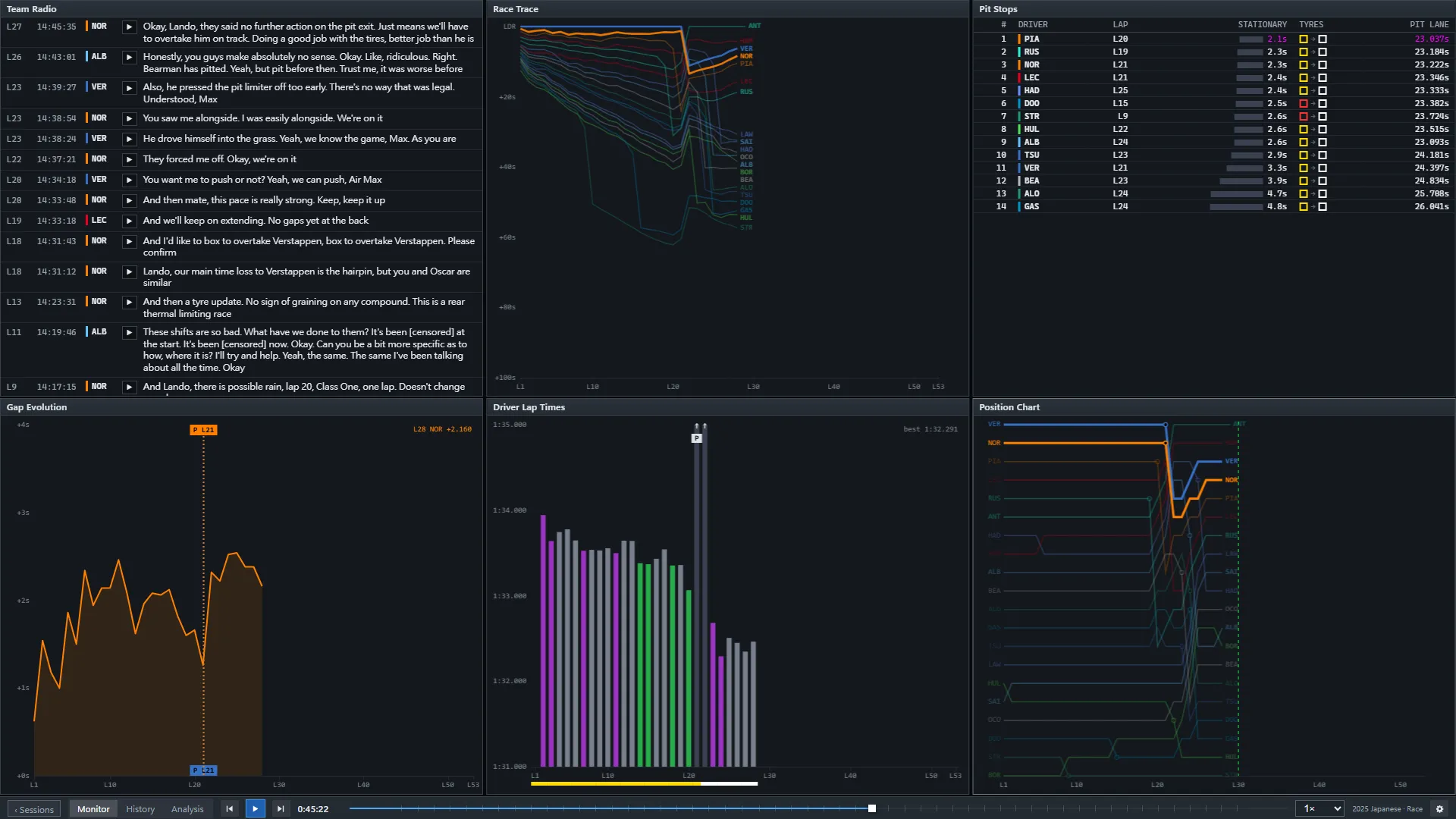
Team Radio, Race Trace, Pit Stops, Gap Evolution, Driver Lap Times and Position Chart windows tiled on the wall

Add panel — right-click any window

  • Gap Evolution — the gap between your two drivers, lap by lap
  • Driver Lap Times — one bar per lap, purple and green bests
  • Position Chart — every car's position at every lap end
04 / RACES

Replay any Grand Prix.

Official timing data, replayed by timestamp. Live sessions follow once the replay pipeline covers both seasons.

2026

17 / 23 live